> For the complete documentation index, see [llms.txt](https://docs.wingbits.com/llms.txt). Markdown versions of documentation pages are available by appending `.md` to page URLs; this page is available as [Markdown](https://docs.wingbits.com/general-help/rewards/claiming-rewards.md).
# Claiming Rewards
Claiming rewards is pretty simple on the Wingbits site.
### Prerequisites
* [Have your main "owner" wallet added](/general-help/rewards/add-wallet-address-to-your-account.md)
* Have at least 50 Wings sitting in "Unclaimed rewards" for each wallet you are claiming to (if you just added wallet(s), you will need to wait for the next rewards engine nightly run currently)
* Any wallet under 50 is skipped and its rewards stay unclaimed until it reaches the minimum. If every wallet is under 50, the "Claim rewards" button stays greyed out.
{% hint style="info" %}
Be aware of how the [claiming grace period](/tge-mainnet/claiming-grace-period.md) works in the project. This will be more obvious the first 7 days of participation.
{% endhint %}
{% hint style="warning" %}
Be careful claiming straight to an exchange deposit address. Exchanges have minimum deposits, and a claim below that minimum can be lost. Check your exchange's minimum first, or claim to your own wallet.
{% endhint %}
### Claim Rewards UI Area
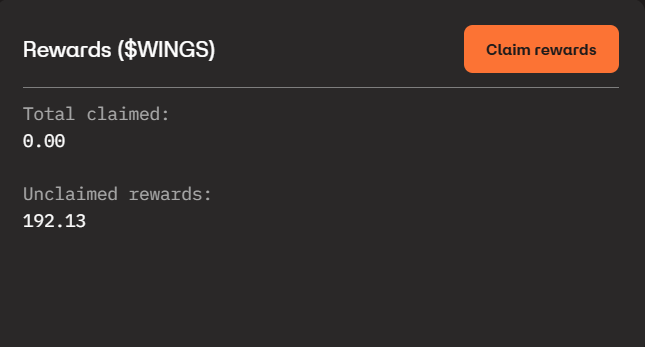
On the top left of your Overview page, you will see a box that contains the Claim Rewards button and how many rewards you have already claimed and also how many rewards are currently unclaimed.
If you have unclaimed rewards, click the "Claim rewards" button.
### Confirm Claim Details
The next screen will list out all the proposed claim details. If you only have an owner wallet, you will see the screen below\... with the receiving wallet address and the amount of tokens to claim. If you have one or more host wallets (due to multiple stations with hosts for each), you will see all the host wallets listed as well and the amount of tokens that will be claimed for each.
### Claim Success
If the claim was successful, you will see the following screen confirming that your claim(s) has/have been queued and you should see the updated Solana wallet transactions within a few minutes. Please refer to the page on [devnet wallet and rewards](/tge-mainnet/devnet-wallet-and-rewards.md) relating specifically to how this currently functions in project beta and on Solana devnet.
### If you can't claim
* "Add a wallet to claim rewards" means you have no owner wallet yet. [Add one](/general-help/rewards/add-wallet-address-to-your-account.md#owner-wallet).
* "All reward balances are below the 50 Wings minimum" means no wallet has enough to claim yet. Rewards keep adding up, so check back later.
* "Invalid wallet detected" means a wallet address isn't a valid Solana address, or is a Program Derived Address (PDA) that can't receive rewards. Update it to a normal wallet address and try again.
* "Claiming Paused" means claiming is closed for maintenance. Try again later.
You may also be asked to verify with a code before the claim goes through. See [Two-factor authentication](/general-help/account/two-factor-authentication.md).
### Claim Failure
If you have a claim failure, your issue might require team investigation of the issue, so please reach out to Wingbits support via the Chat icon shown on the bottom right of every page. Provide all the details regarding the failure (screenshots can be handy) and ask the bot for an agent or human.
### Updated Claim Rewards UI Area
Once you have successfully claimed, the Overview page's claim area should be updated to reflect the "unclaimed" tokens have moved to "claimed".
---
# Agent Instructions
This documentation is published with GitBook. GitBook is the documentation platform designed so that both humans and AI agents can read, navigate, and reason over technical content effectively. Learn more at gitbook.com.
## Querying This Documentation
If you need additional information that is not directly available in this page, you can query the documentation by asking a question.
Perform an HTTP GET request on the following URL with the `ask` and `goal` query parameters:
```
GET https://docs.wingbits.com/general-help/rewards/claiming-rewards.md?ask=&goal=
```
`ask` is the immediate question: it should be specific, self-contained, and written in natural language.
`goal` is what the user is ultimately trying to achieve, the reason they need the answer. Sharing it helps GitBook give you a better, more relevant answer. A goal is most helpful when it describes the outcome the user wants rather than restating the question. For example, with `ask=how do I create an API token`, a goal like `automate deployments from our CI pipeline` lets GitBook tailor the answer to that use case.
The response will contain a direct answer to the question and relevant excerpts and sources from the documentation.
Use this mechanism when the answer is not explicitly present in the current page, you need clarification or additional context, or you want to retrieve related documentation sections.